Security Affairs
Two Barracuda ESG Flaws Could Be Combined for Full Root Access; Patches Released|Cyberattack Hits French Blood Banks as Hackers Target Refrigeration Systems Across Europe|CVE-2026-58868: Critical Android Bug Could Let Attackers Run Remote Code|U.S. CISA adds WordPress flaw to its Known Exploited Vulnerabilities catalog|Binance Hack: How Fake Job Interviews and AI Abuse Led to a $6.34 Billion Attack|Synology Warns of Ransomware Attacks Targeting NAS Devices Running Outdated DSM Versions|Inside XCPE, the botnet that turned 1.3M set-top boxes into proxy servers|NIS2 Makes Board Members Personally Liable for Access Control Decisions|Apple’s spyware notifications reach the Bundestag: what the BSI says to do now|VOLTA, the infostealer that asks an AI which victims are worth the effort|New wave of fridge cyberattacks hits European supermarkets, this time in Belgium, Luxembourg, Sweden and Estonia|Hackers Send Fake Nuclear Threat Alerts to Ukrainian and Russian Citizens|Two Barracuda ESG Flaws Could Be Combined for Full Root Access; Patches Released|Cyberattack Hits French Blood Banks as Hackers Target Refrigeration Systems Across Europe|CVE-2026-58868: Critical Android Bug Could Let Attackers Run Remote Code|U.S. CISA adds WordPress flaw to its Known Exploited Vulnerabilities catalog|Binance Hack: How Fake Job Interviews and AI Abuse Led to a $6.34 Billion Attack|Synology Warns of Ransomware Attacks Targeting NAS Devices Running Outdated DSM Versions|Inside XCPE, the botnet that turned 1.3M set-top boxes into proxy servers|NIS2 Makes Board Members Personally Liable for Access Control Decisions|Apple’s spyware notifications reach the Bundestag: what the BSI says to do now|VOLTA, the infostealer that asks an AI which victims are worth the effort|New wave of fridge cyberattacks hits European supermarkets, this time in Belgium, Luxembourg, Sweden and Estonia|Hackers Send Fake Nuclear Threat Alerts to Ukrainian and Russian Citizens|
Advertisement

Ad Placeholder

Full Width × 90

Breaking News

Funny? Useful? Cool? Kali Linux natively on Windows 10

It’s funny, but it is true, the popular Kali Linux hacking distro is available for download on the official Microsoft App Store on Windows 10. Kali Linux is now natively available on Windows 10, without requiring dual boot or virtualization. Kali Linux isn’t the unique Linux distribution available on the Windows App Store, Windows users […]

Funny? Useful? Cool? Kali Linux natively on Windows 10

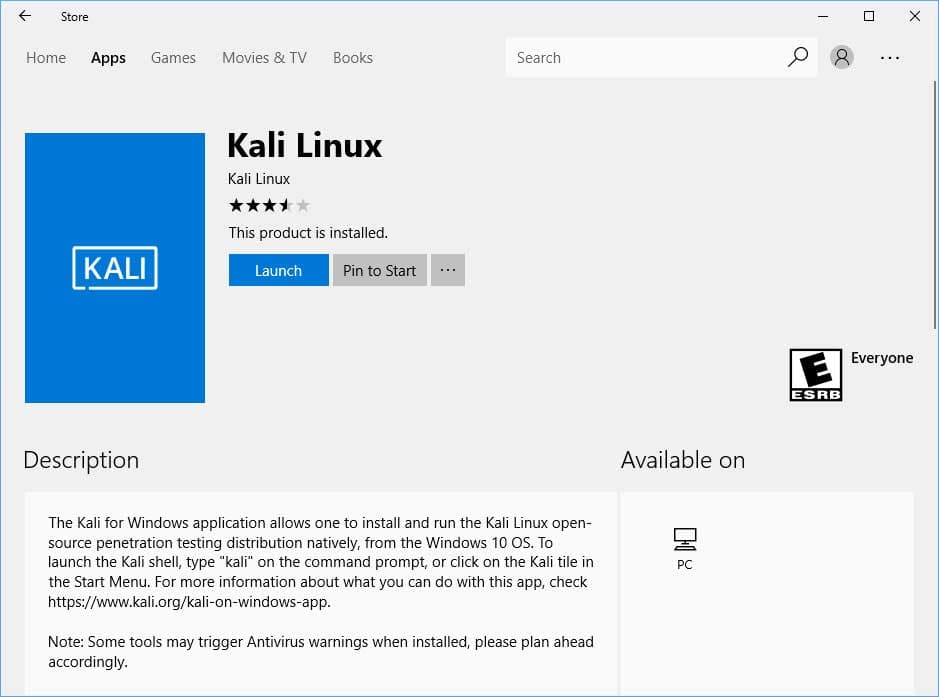
It’s funny, but it is true, the popular Kali Linux hacking distro is available for download on the official Microsoft App Store on Windows 10.

Kali Linux is now natively available on Windows 10, without requiring dual boot or virtualization.

Kali Linux isn’t the unique Linux distribution available on the Windows App Store, Windows users can download other popular distros, including as Ubuntu, Fedora, and OpenSUSE.

The Linux distribution can be used directly on Windows by exploiting the feature called Windows Subsystem for Linux (WSL)

“For the past few weeks, we’ve been working with the Microsoft WSL team to get Kali Linux introduced into the Microsoft App Store as an official WSL distribution, and today we’re happy to announce the availability of the ‘Kali Linux’ Windows application,” reads the announcement published on the Kali Linux website.

“For Windows 10 users, this means you can simply enable WSL, search for Kali in the Windows store, and install it with a single click. This is especially exciting news for penetration testers and security professionals who have limited toolsets due to enterprise compliance standards.”

To enable the WSL follow these steps:

  • Access the “Apps and features” menù item under the Control Panel
  • Select “Programs and Features” from the right panel
  • Click the “Turn Windows features on or off” from the left menu
  • Check the “Windows Subsystem for Linux”
  • Save the operation and Reboot the system

Kali Linux

Alternatively, users can open PowerShell as Administrator and run the following command before restarting the machine.
Enable-WindowsOptionalFeature -Online -FeatureName Microsoft-Windows-Subsystem-Linux
At this point, you can search for Kali Linux on Windows Store and download it.

Offensive Security has published a video to show how to use the distribution on Windows 10.

https://vimeo.com/255052199

It is important to remind that the Kali Linux on Windows does not come with any hacking testing tools pre-installed, this means that you need to download them when needed.

Experts noticed that Antivirus software, including Windows Defender, can flag the distro’s packages as a malware.

[adrotate banner=”9″] [adrotate banner=”12″]

Pierluigi Paganini

(Security Affairs – Linux, malware)

[adrotate banner=”5″]

[adrotate banner=”13″]